Async Steps Configuration
Async Steps Configuration
Async Strategy
Steps can be launched asynchronously. Before starting, you need to choose an execution strategy detailed in the previous chapter Async Step Strategies.
Async Step Configuration
Navigate to the target step group or dashboard and create a new step. If the step is configured as asynchronous during creation, an additional tab will open.f
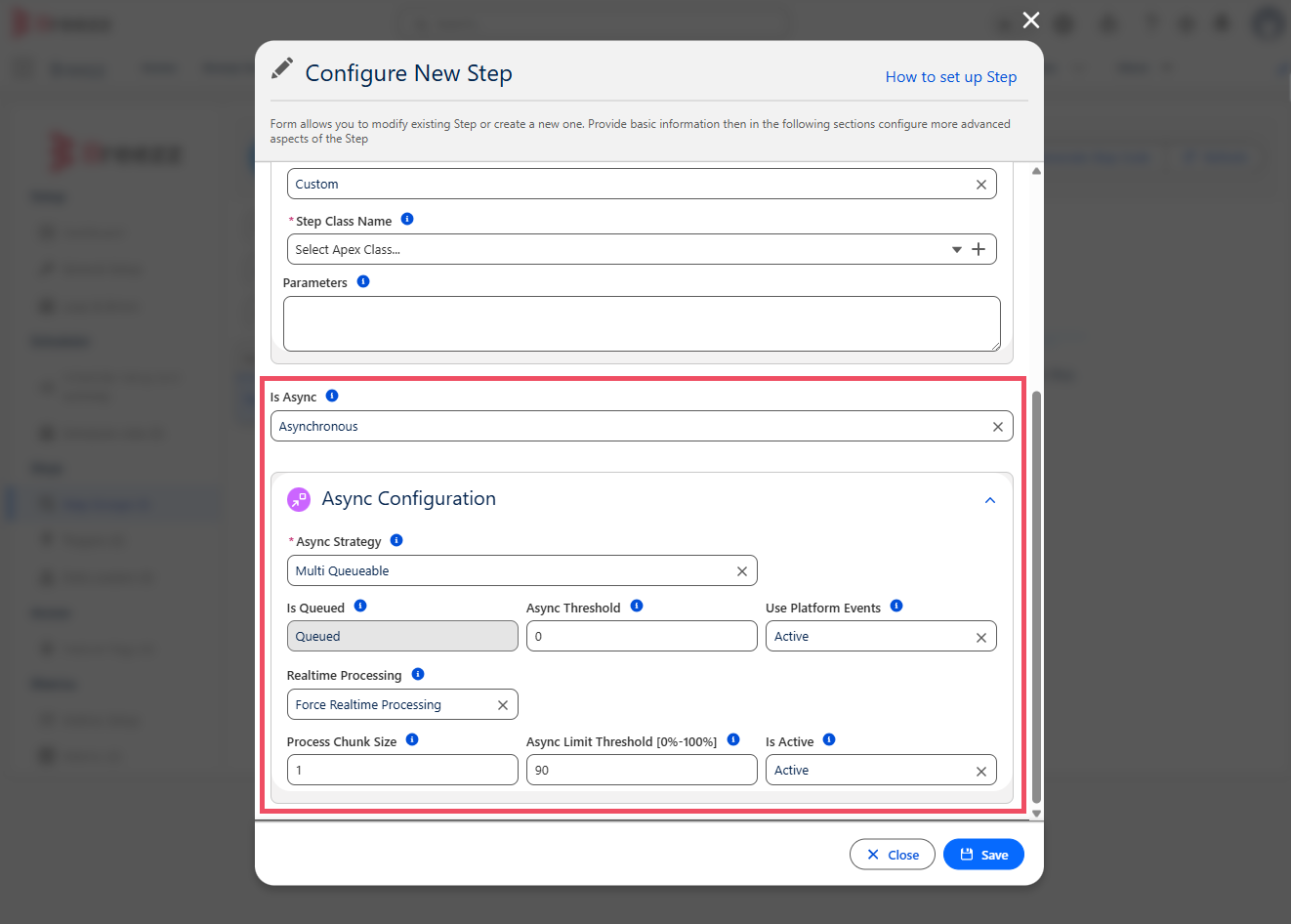
The Async Configuration card provides control over the following settings:
- Async Strategy: Determines the execution method. Avaiable options:
- Multi Queueable: Uses multiple Queueable jobs to process requests (configurable in Async Job Settings).
- Direct: Executes synchronously in a Platform Event trigger (recommended only for simple logic).
- Future: Executes in a Salesforce Future method.
- Queueable: Executes in a Salesforce Queueable job.
- Batch: Executes in a Salesforce Batch job.
- Custom: Allows specifying a custom execution strategy name.
- Is Queued: Determines if requests need to be stored in a queue before execution. Essential for processes requiring fail-safe logic.
- Async Threshold: The minimal number of records required to push execution into the asynchronous scope.
- Use Platform Events: Determines if Platform Events will be used before Async execution. If disabled, the asynchronous job executes in user context
- Realtime Processing: Automatically executes the process immediately after a job is added to the Async Job Queue.
- Process Chunk Size: Determines number of records which could be executed in single Future, Queueable or Batch Chunk job
- Async Limit Threshold [0%-100%]: Async Apex job will be executed only when the actual Platform Async Limit is lower than the provided threshold.
- Is Active: If Active activates async process execution
Advanced Async Job Configuration
If needed Breezz offer additional settings.
⚠️ To enable advanced async job settings reach out to your Breezz contact..
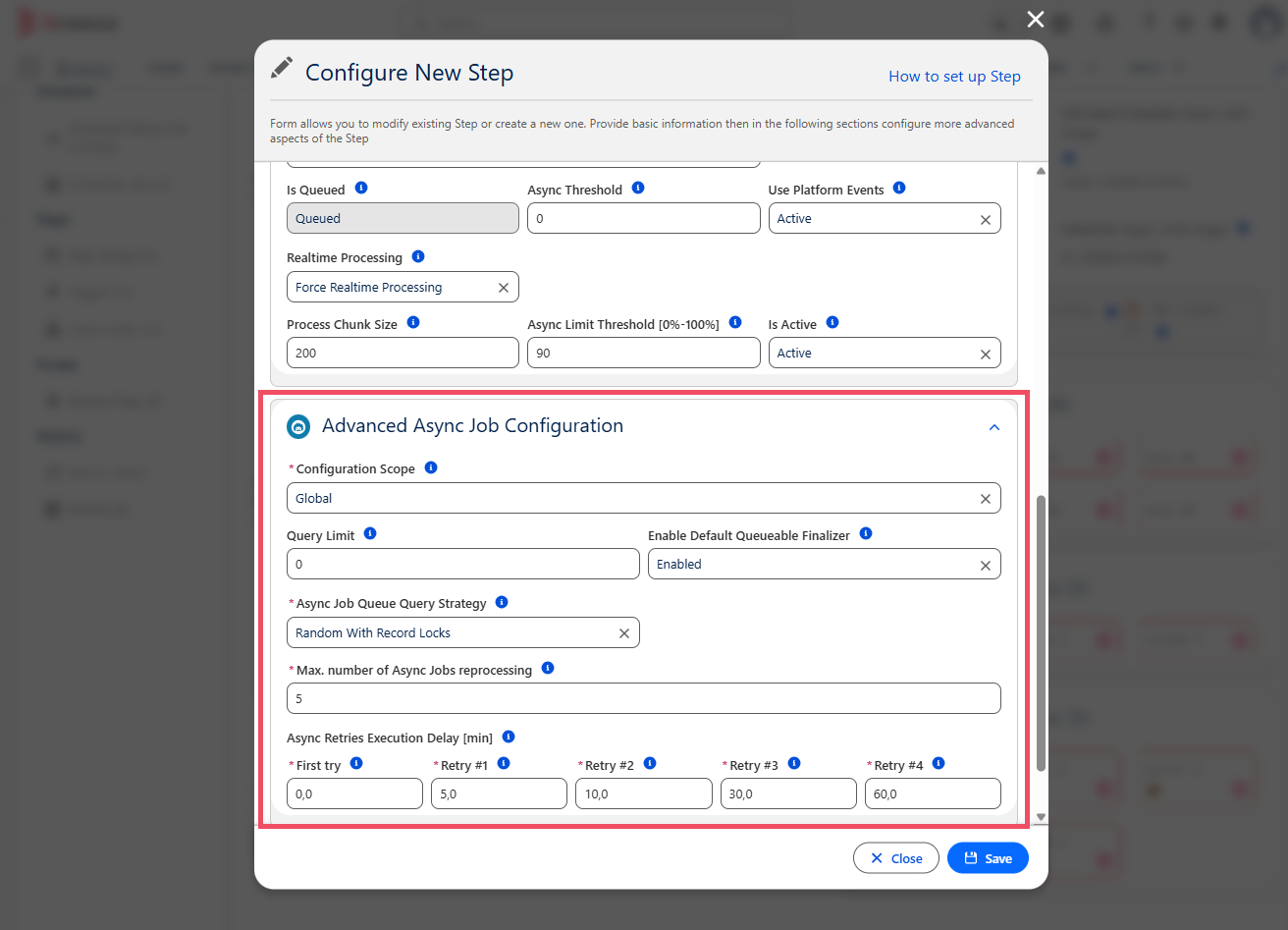
Provides granular control over limits, chunking, and retries:
- Configuration Scop: Async Retries Execution Delay [min].
- Query Limit: A maximum number of records that could be queried in the single processing iteration. The system will create Query Limit / Chunk Size Async job processes. 0 value means that the System will try to query ALL records.
- Enable Default Queueable Finalizer: Enables default Queueable finalizer which saves Unhandled APEX exceptions in the Async Jobs
- Async Job Queue Query Strategy: Async Job Queue Query Strategy defines the way how Async Job Queue will be processed. Avaiable options: Random, Random with Records Lock,LIFO(Stack),FIFO.
- *Max. number of Async Jobs reprocessing: Maximal number of Async Jobs reprocessing, after reaching Max Failed Tries value Async Job will change status to Error and will require manual intervention.
- Async Retries Execution Delay [min]: Maximal number of Async Jobs reprocessing, after reaching Max Failed Tries value Async Job will change status to Error and will require manual intervention. Avaiable four retry.
💡 Apex API Reference: To learn how to programmatically control async execution modes, refer to Breezz APEX API - Async.