Triggers
In the Breezz framework, Triggers serve as execution entry points that capture Salesforce SObject database events and delegate processing to Step Groups.
In the Breezz framework, Triggers serve as entry points that attach execution pipelines (Step Groups) to Salesforce database DML events, Platform Events, or Change Data Capture (CDC) streams.
Instead of writing complex control structures, recursion checks, or context logic directly inside Apex triggers, Breezz delegates all processing to a single framework entry point:
trigger AccountTrigger on Account (before insert, before update, after insert, after update) {
    forvendi.BreezzApi.TRIGGERS.handle();
}
Key Concepts
- Framework Routing: The global
TRIGGERS.handle()router identifies active trigger configurations in Breezz Setup and routes context records to bound Step Groups. - Before Phase: Used exclusively for modifying records in-memory (
Trigger.new) or throwing validations. No external DML or async calls are permitted. - After Phase: Used for transactional DMLs on related objects, launching background workers, or enqueuing emails using
ModificationContext. - Record Split Strategies: Allows triggers to run conditionally based on Record Types or logical field conditions before calling Steps.
Configuring a Trigger
To configure a new Breezz trigger, navigate in Salesforce to:
Breezz Setup → Triggers → New (or click Configure Trigger from the Dashboard).
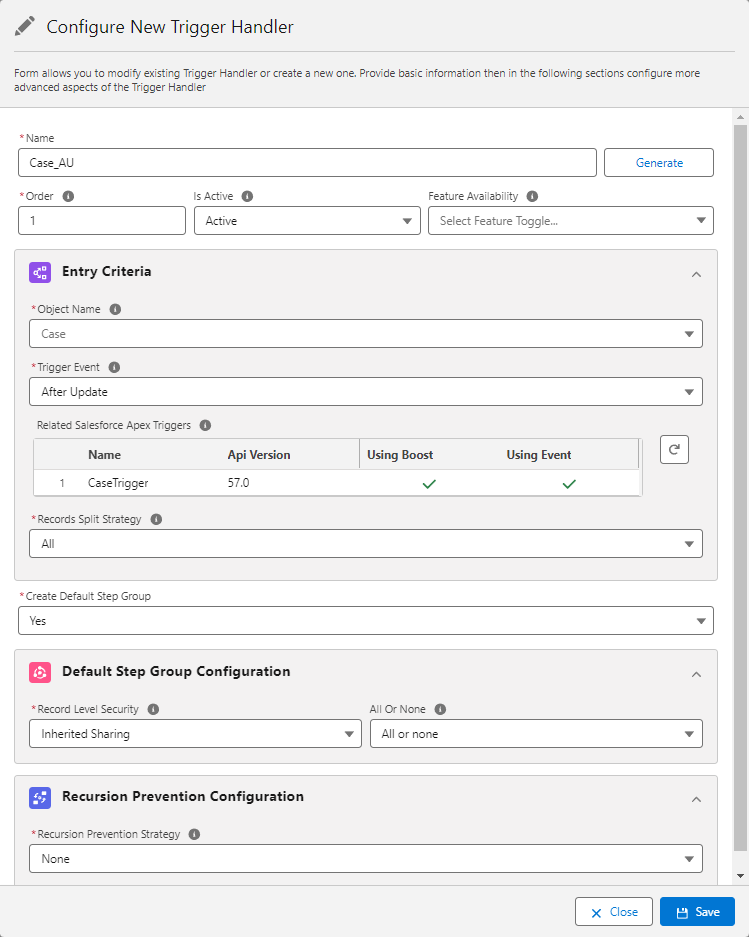
Field Details
| Field Name | Description |
|---|---|
| Name | Unique identifier or name for the trigger configuration. |
| Order | Integer value determining the execution order relative to other active handlers. |
| Is Active | Master toggle to activate or deactivate the trigger execution. |
| Feature Availability | Optional Feature Flag identifier (Breezz Feature Toggle) controlling whether this trigger is active. |
| Object Name | Target Salesforce SObject API name handled by this trigger. |
| Trigger Event | Specifies the SObject event pass (e.g., Before Insert, After Insert, Before Update, After Update, etc.). |
| Records Split Strategy | Strategy used to filter trigger context records before passing them to Steps. |
| Create Default Step Group | Determines whether to automatically bind a new default Step Group (Yes) or use custom Step Groups (No). |
Records Split Strategy
Record Split Strategies allow you to filter the Trigger Context so that Steps run only for records meeting specific conditions:
- All: The trigger processes every record in the context.
- Record Type: The trigger processes only records matching specified Record Types.
- Custom: The trigger filters records based on dynamic custom Apex logic implementing the
TriggerRecordsSplitStrategyinterface. - Condition: The trigger evaluates inline logical conditions against record fields.
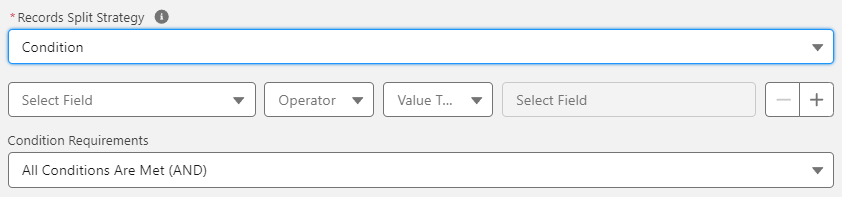
Supported Condition Criteria
- Operators:
Equals,Does Not Equal,Less Than,Less Than or Equal,Greater Than,Greater Than or Equal,In,Not In,Is Set,Is Not Set,Like,Not Like,Starts With,Ends With,Does Not Start With,Does Not End With,Is New,Is Changed,Is New Or Changed. - Value Sources: Static values,
$Record,$User,$UserRole,$Profile,$Organization,$System,$RecordType,$CustomPermission,$Label, or Custom Settings.
Default Step Group Configuration

ℹ️ Note: This card is visible when Create Default Step Group is set to Yes.
- Record Level Security: Specifies the sharing execution mode applied to DML operations within this Step Group.
- All Or None: Determines whether transactional DMLs inside the group use strict transactional error handling (
true) or allow partial success (false).
Advanced Trigger Configuration
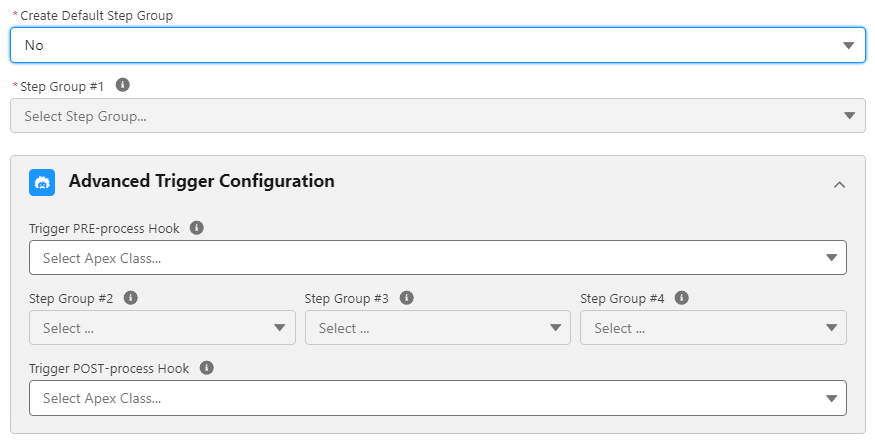
ℹ️ Note: This card is visible when Create Default Step Group is set to No.
- Step Groups 1–4: Sequential groups executed by the trigger to isolate responsibilities. Each group runs within its own isolated execution context (including dedicated
DataStoreandModificationContextinstances).
⚠️ Performance Warning: Running logic across multiple Step Groups creates isolated cache contexts. It is recommended to consolidate steps into a single group whenever possible.
- Trigger PRE-process Hook: Executes custom legacy Apex logic before Steps run. Must specify an Apex class implementing
forvendi.TriggerProcessHook. - Trigger POST-process Hook: Executes custom legacy Apex logic after Steps complete. Must specify an Apex class implementing
forvendi.TriggerProcessHook.
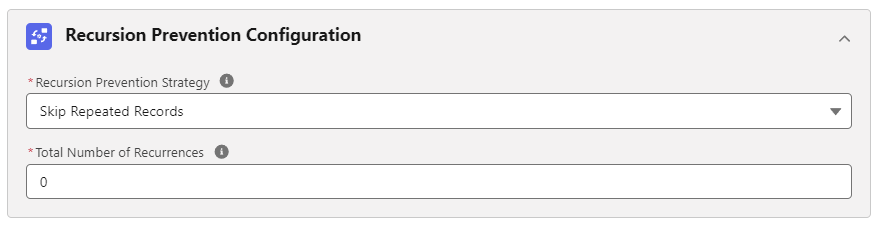
Recursion Prevention Configuration

ℹ️ Note: This configuration is available when Trigger Event is set to Before Update or After Update.
Recursion Prevention Strategy mitigates the risk of infinite trigger re-entry loops:
- None: No recursion prevention is enforced.
- Skip Repeated Records: Prevents repeated processing of identical records up to a defined depth.
- Total Number of Recurrences: The maximum allowed recursion depth before skipping.
💡 Apex API Reference: For custom split logic or process hook interfaces, refer to Interfaces - TriggerRecordsSplitStrategy and Interfaces - TriggerProcessHook.